Blogs
Nvestiq vs TradingView: Which Is Better for Algo Trading?
Aman Anand

TradingView is one of the world's most popular charting platforms, used by millions of traders for technical analysis, social trading, and Pine Script-based strategy development. Nvestiq is an AI-powered platform that lets traders build, backtest, and automate trading strategies using natural language, with no coding required. This comparison breaks down how the two platforms differ and which is the better fit for your trading goals.
Nvestiq publishes this page, so weigh it accordingly.
Feature | Nvestiq | TradingView | MetaTrader 5 |
|---|---|---|---|
Code required | No | Pine Script | MQL5 |
Strategy description | Natural language | Script | Script |
Export formats | Python, Pine Script, JSON | Native only | Native only |
How Do Nvestiq and TradingView Compare?
Nvestiq
No-code interface: Yes, describe strategies in plain English
Plain-English strategy building: Yes, the AI interprets your description and a deterministic compiler produces the exact logic
Backtesting: Built-in, with returns, holding costs, a buy-and-hold comparison and a 0 to 100 Nvestiq score
Live execution: Nvestiq paper trading, Interactive Brokers or Alpaca; export to Python, Pine Script or JSON
Markets: Equities, ETFs, forex and crypto (options and futures coming soon)
Pricing: Early access; a free tier is planned, and paid plans are published at launch
TradingView
No-code interface: No, requires Pine Script
Plain-English strategy building: No
Backtesting: Yes, via Pine Script strategies
Live execution: Via broker integrations (IBKR, TradeStation, etc.)
Markets: Any
Pricing: Free tier plus paid plans
What Does TradingView Do Well?
TradingView excels at charting and community. It offers a wide range of chart types and built-in indicators, plus a social network where millions of traders share ideas and Pine Script strategies. If your primary need is technical analysis and chart-based decision making, TradingView is hard to beat.
TradingView also supports direct broker integrations for live trading and has mobile apps for trading on the go. Its Pine Script language, while requiring coding knowledge, has a massive library of community-built indicators and strategies.
Where Does Nvestiq Have an Advantage?
Nvestiq's core advantage is eliminating the coding barrier entirely. Where TradingView requires you to learn Pine Script to build and backtest strategies, Nvestiq lets you describe your strategy in plain English, for example, "buy when RSI drops below 30 and the 50-day moving average crosses above the 200-day", and a deterministic compiler turns it into exact strategy logic, runs the backtest, and returns a detailed report.
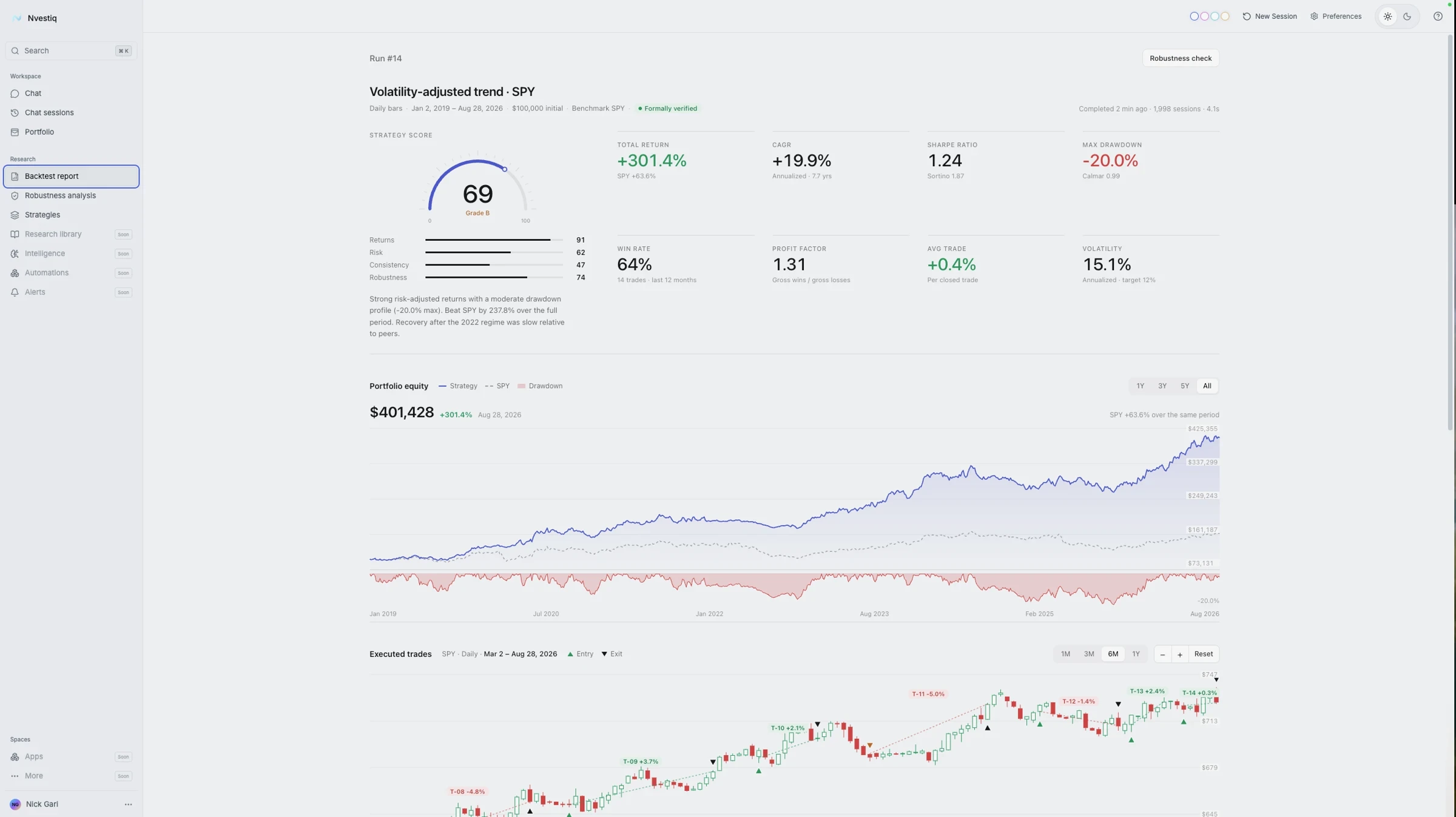
The report Nvestiq returns after a backtest, with no Pine Script involved: a strategy score with sub-scores, key metrics, the equity curve against SPY and each executed trade on the chart. Example data from a hypothetical backtest; not a performance claim.
For traders with strong strategy ideas but limited programming skills, this difference is significant. Writing a moderately complex strategy in Pine Script can take hours or days of debugging. Nvestiq reduces that to a conversation.
Nvestiq also exports directly to TradingView Pine Script, so the two platforms work together: you can design your strategy in Nvestiq and deploy it on TradingView. However, the goal is to bridge the gap between human intuition and algorithmic precision.
Who Should Use Which?
Choose TradingView if:
You're comfortable writing Pine Script or using community scripts
You want direct broker integrations for live trading
You value the social trading community
Choose Nvestiq if:
You want to build algorithmic strategies without coding
You have strategy ideas, but lack Pine Script knowledge (or Pine Script doesn't understand your ambiguity/complexity)
You want AI to help translate complex trading concepts into testable strategies
You want fast iteration from idea to backtest
You plan to deploy on TradingView, but want a faster development workflow
Frequently Asked Questions
Can Nvestiq generate TradingView Pine Script?
Yes. Nvestiq exports strategies as TradingView Pine Script, so you can deploy the exported strategy on TradingView for live monitoring and execution.
Do I need coding skills to use Nvestiq?
No. Nvestiq uses natural language AI: you describe your strategy in plain English (ambiguous or complex), and the platform handles all the technical implementation. No Pine Script, Python, or any other programming language required.
Is TradingView free?
TradingView has a free tier with limited features. Full functionality requires a paid plan. Nvestiq is currently in early access; a free tier is planned, and paid plans and pricing are published at launch.